DD (Due diligence)
Business goal
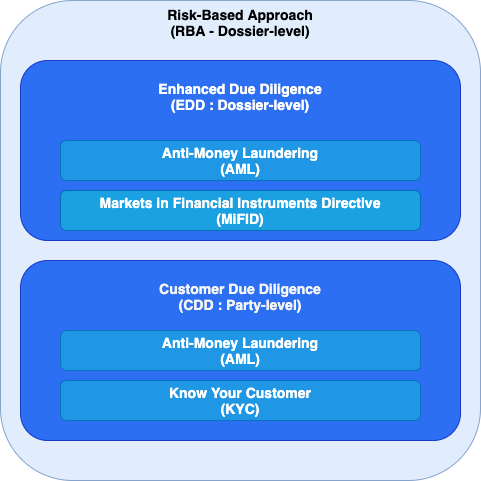
- Perform EDD-checks on Dossier-level
- Perform CDD-check on Party-level
What is Due Diligence
When trying to make a risk model for a dossier, you typically want to categorize certain aspects of the dossier and assign a risk score to these categories. For example:
An investment dossier contains the amount that someone wants to invest: e.g. 100K.
From a risk perspective, 3 categories are defined:
< 50K: not so risky
<= 50K and < 250K: a bit risky
>= 250K: risky
Our RBA module assigns the risk to the categories. But how do we transform the raw data into categories → that’s due diligence.
In the example above, the ‘investment amount risk’ is a DD parameter, the categories are the possible values for that parameter.
The DD card can be configured on dossier level and party level (all types) and can contain multiple parameters each with their possible values. The actual value can either be set manually, but is typically set by a DD provider. A provider transforms data into values. External providers such as LexisNexis or WorldCheck can provide if a certain individual (based on the name, date of birth, …) is a political person or not. Internal providers can do a custom mapping of data to values, such as the investment amount example above.
DD parameters & result values
Parameters
DD checks, DD aggregation, DD configuration, RBA configuration and RBA calculation are all using the same set of DD parameters. The DD parameters are a fixed list of strings. A couple examples:
- PEP
- NATION_UNDER_EMBARGO
- INDUSTRY_LIST
- …
The DD parameters are used as a bridge between raw data and the ultimate goal: an RBA calculation. Only aggregated DD results are used in the RBA calculation in order to avoid a direct link between raw data and the RBA calculation.

DD Result values
The result of a DD parameter can be
- UNDEFINED: When there is no result (yet) for this parameter
- NO: When the parameter is not a HIT
- YES: When the parameter is a HIT
- CUSTOM_VALUE: Same as status: YES, but using values defined by configuration, e.g. HIGH, MEDIUM, LOW, ...
Concealed DD Result values
There is a possibility to ‘hide’ a certain result in the Due Diligence card, because it’s only important when the parameter has a certain result (E.g. undefined conditional AML questions). We call this ‘concealed’ results and can be configured.
Configuration of DD parameters
The Due Diligence Parameter configurations are configured in the settings of module RBA (instead of module DUE_DILIGENCE). See also RBA calculation configuration
dueDiligenceParameterDefinitions: Defines for each DD Subject a list of parameter definitions- Available DD subjects:
DOSSIER,INDIVIDUAL,COMPANY,INDVISION,PARTNERSHIP - Due Diligence Parameter Definition: Defines the name, the possible results and so on:
name: The identifier of the DD parameterparameterResultList: The list of possible values, see definition below- Important: The results need to be sorted from 'least severe' to 'most severe', because the order is used for aggregation of multiple results!
updatable: Defines if the parameter can be updated by the user manually (e.g. to overrule a result coming from an external provider)concealedResults: The values that can be concealed (see Concealed DD result values)filter: This parameter is only applicable (& will only be visible) for dossiers or parties where the condition is met.
- Due Diligence Parameter Result Definition: defines a result value, if it’s considered a “hit” and so on:
value: The identifier of the DD parameterhit: Defines if the result should be considered as a ‘hit’defaultValue: Defines that this value can be used as default when no DD execution is yet performed. If nowhere set, the value UNDEFINED will be the default one.
- Available DD subjects:
{
  "rbaConfiguration": {
    "dueDiligenceParameterDefinitions": {
      "DOSSIER": [
        {
          "name": "DD_PARAMETER_NAME",
          "updatable": false,
          "parameterResultList": [
            {
              "value": "NO"
            },
            {
              "value": "UNDEFINED",
              "defaultValue": true
            },
            {
              "value": "YES",
              "hit": true
            }
          ],
          "concealedResults": [
            "UNDEFINED"
          ],
          "filter": {
            "equals": {
              "fieldPath": "party.company.legalForm",
              "value": "listed"
            }
          }
        }
      ]
    }
  }
}
DD Providers
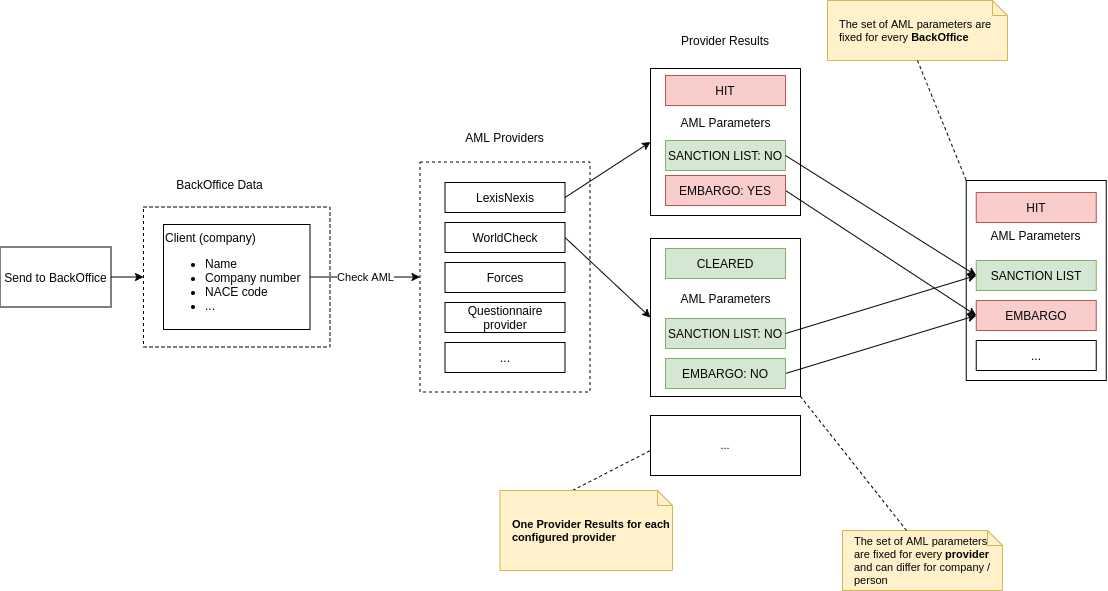
A Due Diligence provider is responsible for defining results for one or more DD parameters. The input from a due diligence provider is taken from the subject (party/dossier) and processed either internally or via an external request (aka external DD providers). This process is further explained as the DD Execution.
In Libraries -> Providers -> Due Diligence there is an overview of all available providers.
DD Execution
Due Diligence execution means that all DD providers are executed: we send the data (input) to all provider and the provider returns DD parameters and their values. Those provider results are aggregated into the DD result where we only have a single value for each parameter. This aggregation step is necessary, because multiple providers could return a value for the same parameter. E.g. both LexisNexis and an internal questionnaire provider know if an individual is a political person or not.
Each DD provider uses a certain set of data points to perform its calculation. We refer to this as the Due Diligence Input.
These data points can be fields on the entity itself (e.g. name, date of birth, company number, industry sector, ….), but can also be answers from a questionnaire of the investor/advisor. The more specific information that is used to request screening results through a screening provider, the less false positive hits will appear.
Caching provider responses
Before executing a DD provider, the application checks if a previous result is still valid and the execution is not necessary (to save resources & reduce costs for requests to external providers).
A previous result is still valid when:
- The Due Diligence Input of the previous result is the same as the current one AND
- The previous result is a recent one (by default we consider results from the last 23 hours as recent, but this is configurable for each provider using a [provider setting](/configuration/libraries/providers/due-diligence-providers/due-diligence-providers.md#⚙️ Configuration) AND
- The previous result was not a
failure- By default, we do 4 retries when a provider fails
Warning: This process is only possible when the execution is not triggered manually by a user (pressing a button in the application). We refer to this as a forced execution.
Document generation
It can be configured on provider-level whether one or more documents need to be generated to visualize the response of the provider. These documents typically contain more details than the Harmoney UI and can be used to make informed decisions about false-positives without requiring access to the UI of the provider. These documents will automatically be generated by the system and can be found under ‘documents’ on the party or dossier.
Remark: Availability depends on screening provider and can be configured to enable or disable them using a [provider setting](/configuration/libraries/providers/due-diligence-providers/due-diligence-providers.md#⚙️ Configuration).
A document is only added when the response of the provider is different to avoid that documents are added on every execution without any added value:
- Screening is triggered
- Pdfs are generated (but not saved)
- Response is the same?
- Yes: save the pdfs on the existing documents.
TimeCreatedof the documents remain the sameTimeUpdatedof the documents are bumped- This allows the user to see since when the response is the same and what the response was during that time, resulting in full traceability.
- No: save new documents
- Yes: save the pdfs on the existing documents.
Retention policy
To allow case management on specific parameters (see Manual edits and case management), we need to save the previous response of the provider. When the next execution is done, the previous-previous response becomes functionally obsolete because it will never be used again.
Provider response can be quite large and customers often have daily screenings configured on thousands of parties. To avoid an exploding amount of data, we have a retention policy of 3 months on obsolete responses.
Provider failures
When a provider fails:
- All previous provider data (if any) is kept as it is, to avoid that manual work is removed when the aggregation is done:
- Provider output is kept
- Provider results are kept (e.g. PEP:YES)
- Provider status is kept (e.g. HIT)
- Since data is kept, it is possible to do the full aggregation as if nothing is wrong. We might have new data from providers that were working, so that data can already be taken into account.
- An indication is added on multiple levels to inform the user about the failure:
- Provider result: indicates that a provider failed
- Parameter result: indicates which parameters are impacted by the failing provider and thus possibly outdated
- Due diligence result: indicates that the due diligence result is outdated due to a provider failure
- RBA: indicates that the RBA rating, score, assessment,… is outdated due to failures on parameters that are used in the calculation
- When a provider fails on the very first check, all parameters of that provider will be UNDEFINED. Those values will be used for the aggregation. The user can still add manual overrides so the process is not blocked (and RBA is correct for example). If the provider would succeed afterwards, those manual results will be removed because there is a change in provider output (no output due to failure vs actual new input). The reason: we cannot know if the manual overrides are correct, because we don’t have any data. We also don’t want to compare dates to know if the manual overrides were done recently or not. This should be a rather exceptional case and should not have a broad impact on a lot of dossiers / parties.
Aggregation
The aggregated result contains all configured DD parameters.
When
An aggregation is done after every “check DD”. This also means that the aggregated DD does not exist until a “check DD” is triggered. The BE however sends all applicable DD parameters to the FE so the user knows which parameters are applicable for the current entity.
Input for the aggregation
The Provider DD results are used as input for the aggregated DD. See Due Diligence Providers for more information.
Simple aggregation
The aggregated DD contains a check for every configured DD parameter. The results are aggregated from the provider results in the following way:
| DD parameter | Provider 1 | Provider 2 | → | Aggregated result |
|---|---|---|---|---|
| A | YES / custom value | YES / custom value | YES / custom value (*) | |
| B | YES / custom value | NO | YES / custom value | |
| C | NO | NO | NO | |
| D | UNDEFINED | UNDEFINED | UNDEFINED | |
| E | UNDEFINED | YES / custom value | YES / custom value | |
| F | UNDEFINED | NO | UNDEFINED | |
| G | not configured | X | X |
(*) when custom values are possible, the (hard coded) configuration defines which custom value is the highest
Generic-detailed mapping
A more complex mapping is applied if a DD provider returns a more generic DD parameter than what is configured. For example,
a DD provider returns PEP but the BackOffice is only interested in BELGIAN_PEP and NON_BELGIAN_PEP, then the
following mapping is applied:
| PEP | → | BELGIAN_PEP | NON_BELGIAN_PEP | Info |
|---|---|---|---|---|
| NO | NO | NO | Since PEP is NO | |
| YES | UNDEFINED | UNDEFINED | ||
| UNDEFINED | UNDEFINED | UNDEFINED |
Due diligence status
The due diligence is calculated at two moments: when the checks are executed and when a manual override of a parameter is done.
-
If a manual override of a DD parameter is done:
Global Status Condition NO_HIT The aggregated DD does not contain YES HIT The aggregated DD does contain YES -
When checks are executed:
The condition of each rule below is verified. If the condition matches, that status is set. If the condition does not match, we go to the next rule.Rule Global Status Condition Comments 1 HIT There is a hit in the aggregated results 2 HIT - Provider result changed (or is new) AND
- Provider status is HIT
Example: LexisNexis does not return YESfor any parameters, but does indicate that there is aHIT. We want to seeHITon DD status on the first execution and in case of changes.3 NO_HIT - No provider FAILED AND
- No provider HIT
4 Unchanged We leave the status as it is when none of the rules above match. Some examples of when this happens: - A provider failed: status remains as it is (could be OPEN or the previous status)
- Nothing changed in provider output.
Manual edits and case management
The aggregated DD can be manually updated if at least one DD parameter is configured as updateable. The manual value is always used if it is present. The manual value will be removed if the system thinks it has a more accurate result.
To avoid losing previous manual work, a manual override should only be removed when the output of a provider changed deliberately (so not because of a failure). See example below.
Data flow