Flow definitions
This page should serve as a guide to help you understand what flow definitions are and how you can configure them in the Harmoney application.
What is a flow definition?
If the word “flow” doesn’t ring any bells, we recommend starting by reading through Concept: Information Exchange.
A flow definition defines the sequence of steps that the counterparty of an information exchange needs to complete to capture all the required data for a client outreach. These steps are grouped in responsibilities that represent a part of the flow aimed at gathering data about a specific subject or topic. Every group/responsibility contains a set of “flow steps”. These flow steps define a specific part of information about the subject.
For example, the responsibility “client” is meant for gathering data about the client of the dossier and it may contain a flow step asking about the bank accounts of the client..
Responsibilities
As mentioned earlier, responsibilities represent a part of the flow aimed at gathering data about a specific subject or topic.
- DOSSIER
- Used for gathering data about the dossier
- IDENTITY
- Used for gathering data about the counterparty (only if the counterparty is of type individual)
- CLIENT
- Used for gathering data about the client
- In case the counterparty is also the client of the dossier, flow steps from the client responsibility won't be asked if they have a similar flow step available under the identity responsibility!
- UBO
- Used for managing the UBOs of the client (if applicable)
- ASSOCIATED_PARTY
- Used for gathering data about the associated parties of the dossier and client. At this moment, the following associated party types are supported:
- Dossier related parties
- Client related parties
- Client owners (UBOs)
- ℹ️ This responsibility is not displayed in the responsibility matrix (module
INVESTOR_FLOW), but allows the system to create separate data flow steps for associated parties.
- Used for gathering data about the associated parties of the dossier and client. At this moment, the following associated party types are supported:
- FINANCIAL_SITUATION
- Used for gathering data about the financial situation of the client.
- KNOWLEDGE
- Used for gathering various data. Usually contains questionnaires used to calculate an investment profile.
- GOALS
- Similar to knowledge. Used for gathering various data. Usually contains questionnaires used to calculate an investment profile.
- SIGNATORIES
- Used to define who should sign the information exchange.
- SIGNATURE
- Defines how the counterparty should sign the data that was provided in previous responsibilities.
- Should contain the
GENERATEflow step first. - Should contain either the
CONFIRMorSIGNflow step last.
Related flow steps: Overview of available flow steps per responsibility
Responsibility cardinality
The responsibility cardinality is only applicable when information exchanges are enabled through module INVESTOR_FLOW.
The cardinality of the responsibility indicates the relation between the responsibility and the counterparties of the dossier. These cardinalities come into play in the responsibility matrix of a dossier (the “dossier responsibles” card)
List of available responsibility cardinalities:
OPTIONAL_SINGLE: The responsibility is optional and can only be assigned to a single counterparty of the dossier.OPTIONAL_EVERYONE: The responsibility is optional and can be assigned to multiple counterparties of the dossier.REQUIRED_SINGLE: The responsibility is required to be assigned to a single counterparty of the dossier.REQUIRED_EVERYONE: The responsibility is required to be assigned to every counterparty of the dossier.
Example of responsibility cardinalities in responsibility matrix of a dossier
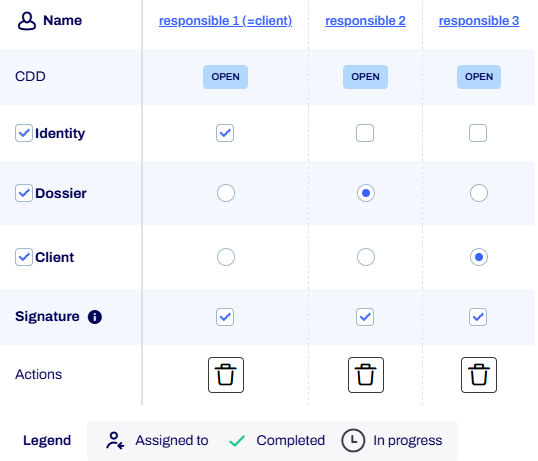
In the image above, you can see an example of a responsibility-matrix for a dossier with three counterparties.
The first column contains the responsibilities that are defined in the flow definition linked to the dossier-definition of this dossier (along with the due diligence status of each responsible).
The subsequent columns each indicate the responsibilities applicable for a responsible.
In this example, the dossier and client responsibilities have cardinality REQUIRED_SINGLE.
So they must be assigned to a single counterparty.
The identity responsibility in the image has cardinality OPTIONAL_EVERYONE, so it can be assigned to any of the responsibles or no responsible at all.
A special case is the signature responsibility.
This responsibility is always required for every counterparty.
Flow Steps
Due to the modularity of the platform, the available flow steps largely correspond to the available modules. For example, if you wish to capture the bank accounts of the client, you'll need a PARTY_BANK_ACCOUNTS flow step.
Since you need the bank accounts of the client, you'll need to configure that flow step in the CLIENT responsibility.
Some flow steps support configuring additional settings. See each flow step detail for more info about what settings are supported.
For some flow steps we support to configure them multiple times. In that case, the flow step can be displayed multiple times during the flow, each using its own configuration. In combination with conditional filters (see below), this allows for a very flexible configuration of the flow where we can show different steps depending on the party's association to the dossier.
It’s possible to define a module for a flow step. In that case, the flow step will only be activated if the module is active on the dossier.
Exclude flow steps from the PDF
By default, all flow steps that contain data are included in the profile PDF that can be generated at the end of the flow.
However, it is possible to exclude specific flow steps from being included in the profile PDF.
To do so, you can configure the excludedFromPdf setting on the flow step settings of a flow step.
Hide flow steps from the side navigation
By default, all flow steps have a corresponding entry in the side navigation of the flow UI.
However, it is possible to hide specific flow steps from the side navigation.
To do so, you can configure the hiddenInNavigation setting on the flow step settings of a flow step.
See BaseFlowStepSettings for the technical model.
Conditional visibility of flow steps
All flow steps support conditional visibility based on the properties of the dossier and the client. A dossier condition can be configured in the settings of each flow step. See BaseFlowStepSettings for more information. The JSON editor in the admin UI supports auto-completion for the available data points that can be used in the conditions.
For some flow steps about data linked to a party, you can also configure conditions based on the associated party type and associated party data points. To be able to differentiate between which associated party types are applicable for an associated party flow step, you can configure AssociatedPartyFlowStepSettings on that flow step. The associated party flow step settings contain a AssociatedPartyDataFilter that defines which associated party types are applicable and supports conditions on party data points, as well as association-specific data points (e.g. relation type).
Providing custom titles
It is possible to alter the titles of responsibilities & flow steps in the UI and the generated PDF by configuring translation keys on the flow steps.
See ResponsibilityDefinitionSettings & BaseFlowStepSettings for the technical model.
Excluding redundant flow steps (Information Exchange only!)
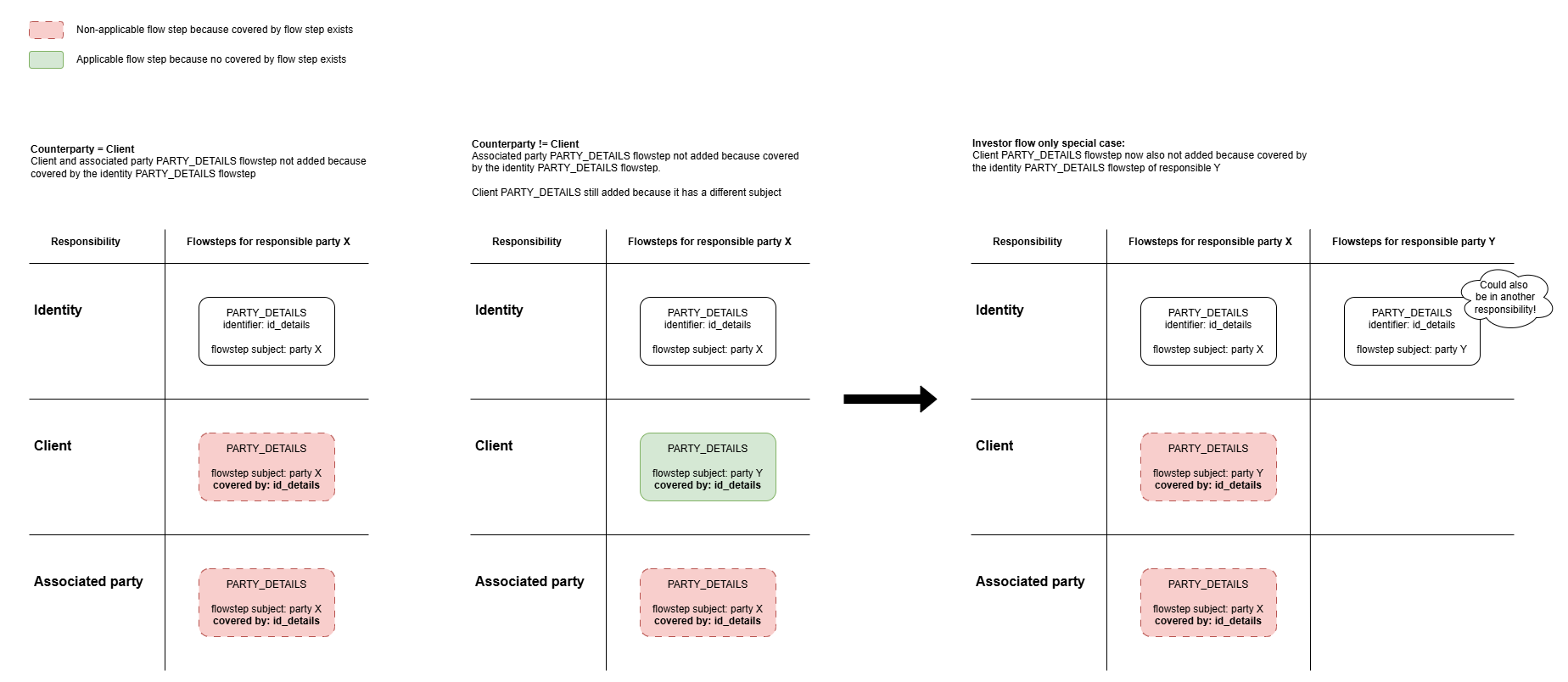
There may be cases where multiple flow steps from different responsibilities are designed to collect the same data for the same flow step subject.
For example, if a PARTY_DETAILS flow step is configured under both the IDENTITY and CLIENT responsibilities,
a responsible party who is also the client would be asked to provide their party details twice.
To prevent these duplicate flow steps, you can use the coveredBy flow step setting to specify which flow steps are considered equivalent
and which one of those flow steps should take precedence over the other(s).
Preconditions for one flow step A to "cover" another flow step B when coveredBy is configured:
- flow step B has a
coveredBycollection that contains the identifier of flow step A - flow steps A and B have the same flow step subject (
flowStepSubject)
Note that the counterparty of the flow step is not taken into consideration. Meaning that in a scenario with multiple responsibles, the flow step of one responsible can be "covered by" the flow steps of another responsible!
Graphical representation of different scenarios
Overview of available flow steps per responsibility
Flow Step | Responsibility | Description | Settings |
|---|---|---|---|
General steps | |||
| Displays a summary/information page in the flow. See also this page. | ||
Related to dossier data | |||
|
| Form for “general” information about the dossier. | |
| This flow step shows questions from a configured form section | ||
|
| Flow step displaying question sections with subsegments | |
|
| Allows uploading documents related to the dossier. See also this page. | |
|
| Allows managing bank accounts related to the dossier. | |
|
| Allows managing the related parties of the dossier. | |
|
| Allows the user to define who needs to sign. | |
Related to a party (client, associated party, counterparty, ...) | |||
|
| Allows retrieving identity information about the party through the use of an identity provider. Precondition: party is an individual | |
|
| Form for “general” information about the party. | |
| This flow step shows questions from a configured form section | ||
|
| This flow step bundles all questions for the configured subsegment ( | |
|
| Form for information about the identity of the party. Precondition: party is an individual | |
|
| Allows uploading documents related to the identity of the party. See also this page. Precondition: party is an individual | |
|
| This flow step bundles all questions for the configured subsegment ( Precondition: party is an individual | |
|
| Allows managing tax information of the party. | |
|
| Allows uploading documents related to the party. See also this page. | |
|
| Allows general management of the UBOs of the client. Precondition: client is not an individual | |
|
| When UBO members are present, their identity data can be captured in their corresponding flow steps defined by the ASSOCIATED_PARTY responsibility.Depending on the configuration, it is also possible to request the data by inviting the UBO to the flow.Depending on the configuration, it is also possible to complete the data in this step directly (which is a legacy feature) Precondition: client is not an individual | |
|
| Flow step displaying question sections with subsegment Precondition: client is not an individual | |
MiFid related | |||
|
| Flow step displaying question sections with subsegment | |
|
| Flow step displaying question sections with subsegment | |
|
| Flow step displaying question sections with subsegment | |
Related to the signing at the end of the flow | |||
|
| This flowstep is always required. It processes all provided data from the responsible, calculates the test results and investment profile if applicable and generates the PDF to be signed by the counterparty. | |
|
| Allows the user to confirm the data they submitted at the end of the flow. Alternative for the sign flowstep. | |
|
| Allows the user to sign the data they submitted at the end of the flow. | |
|
| Automatically added, you never need to configure this flowstep! | |
|
| Automatically added, you never need to configure this flowstep! | |
Miscellaneous | |||
|
| Automatically added, you never need to configure this flowstep! |
Helpdesk
To be able to provide support when the counterparty is blocked or has issues during the flow, a helpdesk can be configured on the flow definition. When configured and enabled, a "Help" button will be available in the sidebar of the flow. When clicked, a modal will be opened with a configurable title and HTML supported text.
Refer to the flow definition JSON settings for more information:
Settings Configuration
Configuring a flow definition
Managing a flow definition
Flow definitions can be managed by users with the administrator role. To manage flow definitions, as admin, navigate to “Libraries” → “Flow definitions”.
Currently, there are no CRUD actions that can be performed in the UI. Instead, we can manage flow definitions by importing and exporting them in JSON format.
Link the flow definition
Flow definitions are configured on dossier definition level and each dossier definition can have one flow definition. This means that client outreaches on a dossier always follow the same structure defined by the configured flow definition.
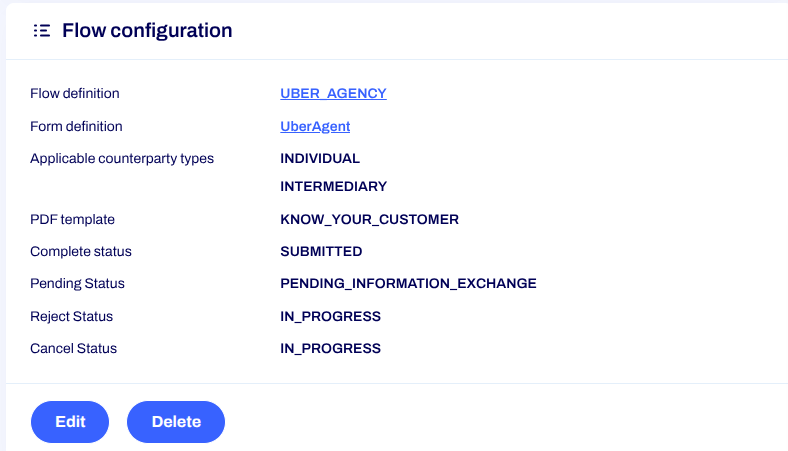
The flow definition is configured as a “flow configuration”. Dossier definitions can have different lifecycles or “state diagrams”. To be able to integrate any flow definition into the dossier lifecycle of a dossier definition, some additional settings are configurable on the flow configuration. These settings ensure that any flow definition is compatible with any dossier definition. Here is an overview of these additional settings and what they do:
- Start statuses: Optional list of statuses that the dossier should be in to be able to create an information exchange.
- Pending status: Status that the dossier will be transitioned into when a client outreach is started.
- Complete status: The target status that the dossier will be transitioned into after the flow is completed. This setting is required, because a dossier transition is always done after a client outreach is completed.
- Reject status: Status that the dossier will be transitioned into when a client outreach is rejected by the counterparty.
- Cancel status: Status that the dossier will be transitioned into when a client outreach is canceled.