RBA (risk based approach)
Business goal
Risk Based Analysis of a Dossier, specific risk calculation to determine the risk of a dossier. The risk is expressed in a rating (for example: low / medium / high). Based on the risk, a conclusion can be made: the risk assessment (for example: acceptable / not acceptable).
Functional documentation
Prerequisites
Read Due diligence (step 1 in the diagram below), as the aggregated Due Diligence Results are used as input for the RBA aggregation. This page describes the 2nd step.
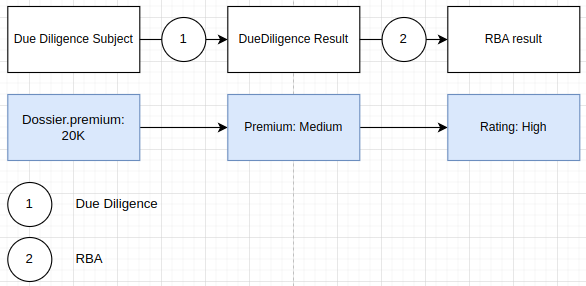
RBA Result
The RBA result describes the risk of a dossier. The following properties are available:
| Property | Type | Notes |
|---|---|---|
| Rating | Enum | Categorizes the risk of a dossier. E.g. LOW, MEDIUM, HIGH. |
| Escalation | Boolean | If the risk is a above a certain level, a dossier has an escalated risk and can be treated differently. E.g. approval by a compliance officer is necessary. Only available when the subfeature escalation is enabled.See RBA escalation |
| System assessment | Enum | Categorizes what you want to do with the risk of the dossier. E.g. ACCEPTABLE / NOT ACCEPTABLE. Only available when the sub-feature assessment is enabled. Calculated by the system. |
| Manual assessment | Enum | Same as system assessment. Can optionally be completed by a user. |
| Assessment | Enum | The eventual assessment is equal to the manual assessment when there is one, else it’s equal to the system assessment. |
| Total score | Integer | Score of the dossier: this is the sum of the scores of all parameter results. Only available when the RBA calculation is a score-based. |
| Sensitivity | Enum | Categorizes the sensitivity of a dossier. E.g. certain dossier services are more sensitive to shady activities than other. This sensitivity can be taking into account when calculating the score for a parameter. Only available when configured. |
| Parameter results | List | The source for the calculation of the RBA result. Parameter results are aggregated from all Due Diligence Subjects of the dossier. |
RBA calculation
RBA calculation depends on the Due Diligence results of the underlying entities of the dossier. See section below for a more detailed explanation of how the RBA calculation works: RBA calculation in detail
RBA escalation
If the risk is a above a certain level, a dossier has an escalated risk and can be treated differently. This is a feature that needs to be enabled through module settings & field definitions (see configuration).
The escalation value will become visible in the RBA card and will be shown in the dossier list as well.
The escalation feature is often used together with a validation that the dossier should follow a different process (e.g.
not every user can approve the dossier). One of the generic validations can be used InvalidStatusTransition together
with a dossier filter that filters on the escalation property.
RBA assessment
It’s possible to override the system assessment with a manual assessment.
The manual assessment is cleared when the RBA input changed compared to the previous execution. Even though the eventual RBA rating and even the RBA parameter results are the same, it might be that the underlying risk is different. These changes are taken into account to know when to reset the manual assessment.
Functional example
For example, assume Individual X is flagged in a due diligence provider as PEP, because he is the mayor of some small city.
- Execute due diligence checks
- DueDiligence provider result:
PEP: YES- Save the raw result of the provider response
- Aggregated DueDiligence result for Individual X:
PEP: YES
- DueDiligence provider result:
- Calculate RBA
- RBA parameter result:
PEP: YES - RBA rating:
HIGH - System assessment:
NOK
- RBA parameter result:
Manual override:
- Manual assessment:
OK
Rescreening:
- Execute due diligence checks
- Compare the raw result of the response with the previous response
- There are no changes in the response
- Nothing changed on the aggregated due diligence result
- There are changes in the response
- Changes on the aggregated due diligence result
- There are no changes in the response
- Compare the raw result of the response with the previous response
- Calculate RBA
- Compare the previous RBA input with the new RBA input
- If nothing changed on the input:
- Manual assessment is kept as-is
- If something changed on the input:
- Manual assessment is reset
- If nothing changed on the input:
- Compare the previous RBA input with the new RBA input
Configuration
Enable RBA
- Enable the module RBA on the FSP Definition.
- Configure fields related to RBA in the field definition provider to be visible.
RBA calculation configuration
In the module settings, define:
All used Due Diligence Parameters (see [Configuration of DD parameters](../due-diligence/due-diligence.md#Configuration of DD parameters))
{"rbaConfiguration": {"dueDiligenceParameterDefinitions": { ... }}}The list of possible RBA ratings (ℹ️ For escalation, see RBA escalation configuration)
{"rbaConfiguration": {"ratings": [{"rating": "LOW","upperBound": 0},{"rating": "HIGH","lowerBound": 10}]}}How the calculation of the RBA works: parameter based vs scoring based
Which RBA parameters apply for which subject (dossier, party):
rbaParameterSupplierIf not provided, all configured DD parameters are taken into account for the associated parties defined in the FSP definition
associatedPartyTypes: same as above, but using these associations instead of the ones on FSP definition ⚠️ DOSSIER is always included!'{"rbaConfiguration": {"rbaParameterSupplier": {"associatedPartyTypes": ["CLIENT", "OWNER"]}}}v10
rbaParametersByType: define the parameters yourself for each association (allows different set of parameters based on the association){"rbaConfiguration": {"rbaParameterSupplier": {"rbaParametersByType": {"DOSSIER": ["ESG"],"CLIENT": ["PEP","SANCTION_LIST"],"RESPONSIBLE": ["PEP"]}}}}rbaParameterSupplierClass: implement the parameters in code, for more specific request not possible through configuration{"rbaConfiguration": {"rbaParameterSupplier": {"rbaParameterSupplierClass": "eu.myharmoney.customer.xxx.XxRbaParameterSupplier"}}}
- Additional options:
hideScores: (default: false)includeAllDueDiligenceResults: (default: false)- If enabled, all parameters of all specified associated parties that are not
UNDEFINEDwill be taken into account in the RBA calculation - Functional goal:
- Let’s say you start with a default config: all parameters of all associated parties (here: client and UBO) are taken into account for RBA.
- All data is required for the client, so you add a score for
UNDEFINEDon all params to make sure missing data is highlighted. - You might not have all data for the UBOs so some DD params will be
UNDEFINED. That’s OK. The data is not really required. - You now get
UNDEFINEDon RBA because the data is missing on the UBOs. So you exclude some parameters for UBO. - Now you no longer get
UNDEFINED, because the data is present party popper - The question: but what if the data IS present on the UBO. Wouldn’t it be good to use that too? If the answer is yes, set includeAllDueDiligenceResults:true.
- Example 1:
- RbaParameterSupplier: include
PEPforCLIENT, but not forUBO - Data: client has
PEP:NO, UBO hasPEP:YES - RbaScoring:
PEP:YES→ 100 - Result with
includeAllDueDiligenceResults:false→PEP:0(not interested in PEP of the UBO, so don’t use it) - Result with
includeAllDueDiligenceResults:true→PEP:100(we have a value for PEP for the UBO, so we want to take that into account)
- RbaParameterSupplier: include
- Example 2 (undefined behavior):
- RbaParameterSupplier: include
PEPforCLIENT, but not forUBO - Data: client has
PEP:NO, UBO hasPEP:UNDEFINED - RbaScoring:
PEP:YES→ 100,PEP:UNDEFINED→ 1000 - Result with
includeAllDueDiligenceResults:false→PEP:0(not interested in PEP of the UBO, so don’t use it) - Result with
includeAllDueDiligenceResults:true→PEP:0(we don’t have a value for PEP for the UBO, so don’t use it)
- RbaParameterSupplier: include
- If enabled, all parameters of all specified associated parties that are not
sensitivitySupplier: Customer specific configuration that defines the sensitivity of the RBA calculation
Parameter based calculation
parameterConfig- Contains a map where the key is the DD parameter and the value is a list of DD results for which RBA is a hit ⚠️ Only 2 RBA ratings are supported and the highest one is considered as the hit
{
  "rbaConfiguration": {
    "basedOn": "PARAMETER",
    "parameterBasedConfiguration": {
      "parameterConfig": {
        "PEP": ["YES"],
        "SANCTION_LIST": ["MEDIUM","HIGH"]
      }
    }
  }
}
Score based calculation
initialScore: Defines an initial score (default 0)parameterConfig_XXX_.resultScores: defines the score for a due diligence result- ⚠️ The order of the scores is important for the aggregation (multiple parties with a result for the same parameter). Define them from lowest risk to highest risk!
_XXX_.sensitivityMultipliers- ⚠️ Not supported yet because defining sensitivity not yet possible config wise (only possible through
rbaConfigurationClass)
- ⚠️ Not supported yet because defining sensitivity not yet possible config wise (only possible through
_XXX_.customRbaCalculationClass: override calculation using code
{
  "rbaConfiguration": {
    "basedOn": "SCORE",
    "scoreBasedConfiguration": {
      "initialScore": 0,
      "parameterConfig": [
        {
          "parameter": "INDUSTRY",
          "resultScores": [
            {
              "result": "MEDIUM",
              "score": 10
            },
            {
              "result": "HIGH",
              "score": 20
            },
            {
              "result": "UNDEFINED",
              "score": 1000
            }
          ]
        },
        {
          "parameter": "PREMIUM",
          "customRbaCalculationClass": "eu.myharmoney.app.bll.rba.PremiumRbaParameterConfiguration"
        }
      ]
    }
  }
}
RBA escalation configuration
Module settings
escalation.enabled: Enables the escalation feature.- To set the value based on the RBA score/rating, add this to the configuration of the RBA ratings
Example:
{"escalation": {"enabled": true},"rbaConfiguration": {"ratings": [{"escalation": true,"lowerBound": 50,"rating": "VERY_HIGH"}]}}
Configure the field definitions to make the field visible
RbaDTO_.escalation: the field on the RBA cardDossierDTO_.escalation: Added to risk score when shown in a dossier list. ⚠️ Shouldn’t this field be default InputType HIDDEN?
RBA assessment configuration
- Configure the lists that contain the possible system & manual assessments
- ⚠️ When both system & manual are used, make sure the system assessment list contains ALL values of the manual assessment!
- Configure the field definitions to make the fields visible
- TODO
- Add module settings when you want to calculate the system assessment automatically:
assessmentproperty:enabled: Enables the feature to automatically set the system assessmentlockManualAssessment: Specifies whether the manual assessment should be retained in case the assessment input changes and the manual result would typically be clearedscoreBasedorparameterBasedratingBased: Mapping between the rating (key) and the system assessment (value)scoreBased: Mapping between the score (key) and the system assessment (value)
Example rating base:
{
  "assessment": {
    "enabled": true,
    "ratingBased": {
      "LOW": "APPROVED"
    },
    "lockManualAssessment": false
  }
}
Example score based:
{
  "assessment": {
    "enabled": true,
    "scoreBased": {
      "minScore": 0,
      "maxScore": 10,
      "systemAssessment": "APPROVED"
    },
    "lockManualAssessment": false
  }
}
Settings
Settings Configuration
RBA calculation in detail
1. Calculate the sensitivity (optional)
Given the dossier, the sensitivity can be calculated. The sensitivity of a dossier can be used in a score-based calculation to multiply the score for a parameter (see point 3). An example:
| DossierType | DossierService | → | Sensitivity |
|---|---|---|---|
KYC | KYC | WEAK | |
INSURANCE | PENSION SAVING | MEDIUM | |
INSURANCE | IPT | HIGH |
2. Gather the input
All Due Diligence parameter results of these entities can be taken into account during the calculation:
- Dossier
- Associated parties of the dossier:
- Client
- Associated parties of the client:
- UBOs (if the client is of type company)
- Members (if the client if of type indivision or membership)
- Related parties
- Associated parties of the client:
- Responsibles
- Insured persons
- Related parties
- Beneficiaries
- Client
We do not allow using any other data, such as related parties of related parties.
Limiting the input
- It is possible to specify a different set of associated party types, e.g. you’re only interested in the responsibles and the related parties of the client, but not in the ubos.
- It is possible to limit the Due Diligence parameters of certain entities. For example:
- For the responsibles: we take all available DD parameters into account
- For the related parties: we only take a limited set of DD parameters into account
- If there is a party field metadata X: we take this specific set of DD parameters into account
Required parameters
All the parameters that result from the definition above are considered required. There must be a parameter
calculation configuration for each required parameter. The calculation will be applied even if there is no due
diligence parameter result available or if the result is UNDEFINED.
Optional parameters
Due to the input limitation, certain due diligence parameter results are not taken into account. To exploit this data it is possible to configure RBA to take this data into account. The scoring of these additional parameters is as follows:
- If
UNDEFINED: no result for the parameter - Else: apply the defined scoring for the parameter (standard behavior).
For example
- There is a configuration for
PEP, with mappingYES -> score:100; UNDEFINED -> score 1000 PEPis a required parameter forCLIENT, but not forRESPONSIBLE
Assume there is PEP: true defined in the due diligence of the responsible and PEP: false for the client:
- When RBA is configured to ignore optional parameters: no score will be added for
PEP: trueof the responsible, even though we have the data - When RBA is configured to include optional parameters: score of
100will be added
When there is PEP: UNDEFINED for the responsible, no score will be added, because the parameter is not required.
3. Calculate the RBA parameter result for each parameter
A calculation is executed per due diligence parameter result per subject as defined above. Each due diligence parameter result is mapped to an RBA parameter result. Depending on the configuration, there might be no RBA parameter result, because we’re not interested. This is to make sure we only see things in the UI that are relevant.
Score-based
A score can be defined for one or more of the parameter results. Scores need to be integers (negative allowed).
For example for the parameter INDUSTRY_RISK, we know from the Due Diligence configuration that the following
results are possible:
NONEUNDEFINEDMEDIUMHIGH
We want to add a score for all results except NONE, so we define the following mapping:
| Result | Score |
|---|---|
| MEDIUM | 5 |
| HIGH | 10 |
| UNDEFINED | 1000 |
Since we did not include NONE, there will be no RBA parameter result for this entity and parameter.
Next to this basic score, it is also possible to apply a sensitivity multiplier based on the sensitivity of the dossier. This multiplier can be specified on parameter-level. For example:
| Sensitivity | Multiplier |
|---|---|
| WEAK | 1 |
| MEDIUM | 2 |
| HIGH | 4 |
For example: INDUSTRY_RISK: HIGH for a dossier with MEDIUM sensitivity results in a score of 20.
Parameter based
Verify similar to score-based, but there is no score involved. The only required configuration is the set of results that need to be included per parameter. For example:
| Parameter | Results to include |
|---|---|
INDUSTRY_RISK |
|
EU_COUNTRY |
|
If a result is included in the config, it will lead to an RBA parameter result.
4. Aggregate the parameter results
In this step, we need to go from multiple RBA parameter results to a single result per parameter. For example if we have:
INDUSTRY_RISK:MEDIUMINDUSRTY_RISK:HIGHINDUSTRY_RISK:UNDEFINED
In the parameter calculation configuration (see step 3), the results that are included are ordered from lowest to highest risk:
- If we configure
MEDIUM < HIGH < UNDEFINED, the example above will be aggregated toUNDEFINED - If we configure
MEDIUM < UNDEFINED < HIGH, the example above will be aggregated toHIGH
5. Calculate the total score (optional)
Only applicable when the parameter calculation configurations are score-based.
The total score is the sum of all RBA parameter result scores as explained above. Since this sum is calculated after the aggregation, each parameter result score is only counted once in the RBA score.
E.g. in case the responsible is PEP (score 10) and the client is PEP (score 10) → score taken into account on dossier level will be 10
The starting value before calculating the sum can be configured. By default this value is 0.
6. Calculate the rating
Score-based
The rating is a readable classification of the score. For example:
LOWif score < 10MEDIUMif score >= 10 and score < 20HIGHif score >= 20
Parameter-based
The rating is a readable classification of the final RBA parameter results. For example:
LOWif there are no RBA parameter resultsMEDIUMif the RBA parameter results includeCOUNTRY_RISKorINDUSTRY_RISKHIGHif the RBA parameter results includeCOUNTRY_RISKandINDUSTRY_RISK
7. Calculate the escalation (optional)
The escalation can for example be used to:
- Restrict dossier status transitions to users with a certain role
- Automate dossier status transitions
- Send out an email for escalated dossiers
- …
The escalation of a dossier is derived from the rating, e.g. :
escalated: trueif rating =HIGH
8. Calculate the system assessment (optional)
The system assessment can be used in a similar way as escalation.
Score-based
The system assessment is derived from the total RBA score. A mapping needs to be defined. For example:
- Score between 0 (inclusive) and 10 (not inclusive) → system assessment =
OK - Score between 10 (inclusive) and 20 (inclusive) → system assessment =
NOK
Rating based
- Rating =
LOW→ system assessment =OK - Rating =
HIGH→ system assessment =NOK
Reopening of a dossier due to rescreening
Many of our customers have a rescreening in place. Every customer has their own Confluence page where the specific rules for rescreening are defined.
For explanatory purposes, we will discuss the default configuration:
Dailyrescreening- For dossiers in status
DONE - Bringing these dossiers to the status
SUBMITTEDin case of change in the RBA input.
The daily rescreening was implemented to make our users aware of any changes within the dossier with impact on the RBA.
If there is a change in the dossier, we want to make our user aware of this by reopening the dossier in the status
SUBMITTED. This way our users can reassess the dossier. In order for the system to know if there are any
changes, it runs DD checks and calculates the RBA score.
General rule: change in input
In most use cases, the RBA matrix remains unchanged. This means the dossier will end up in SUBMITTED due to a change
in the input/output from a provider e.g. the questionnaire, sector list, LexisNexis,...
The dossier will end up in submitted if there is a change in the input/output for a parameter whose system assessment
is included in the RBA calculation.

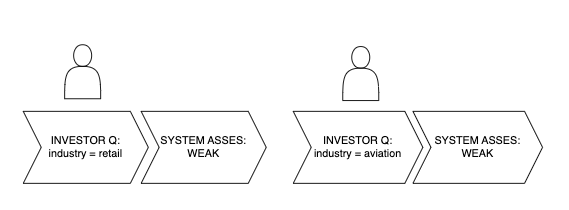
Use case: change in input for included system assessment

- Provider = questionnaire
- DD parameter = Industry
- Included system assessments in the RBA calculation = weak, medium, high

This means the dossier will also reopen if the input changes but the system assessment does not, as long as the system assessment is included in the RBA calculation.
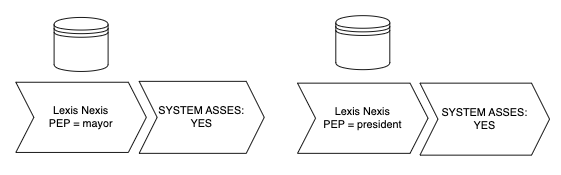
Use case 2: change in input for not-included system assessment

- Provider = LexisNexis
- DD parameter = PEP
- Included system assessments in the RBA calculation = yes

Changes to the RBA matrix
Use case: a parameter is added to the RBA calculation
Is considered a change of input. Reopening depends on the system assessment.
Use case: a party type is added to the RBA calculation
SwissLife decided that the insured person (and all CDD parameters) should be included into the RBA calculation.
If the insured person = a party type in the dossier already included in the RBA calculation e.g. the client.

If the insured person is not = to a party type in the dossier already included in the RBA calculation e.g. the client.

Use case: splitting up an existing parameter into two.
SwissLife mapped both Sanction and Special Interest to the DD parameter Sanction. They wanted to split this up to be able to differentiate between both risks.
To avoid reopening of all dossiers, we added the DD parameter Special Interest, since this parameter had the highest chance of NO HIT. This new parameter would then lead to the flow below.

Use case: merging two existing parameters into one.
HAAS wanted one single country risk on dossier level. Initially, there were parameters nationality and address defined,
which could lead to two HITS related to country on dossier level, which would increase the overall risk of the dossier.
One single DD parameter was created country risk which was fed by the same provider as nationality and
address, being country list.
As there was a change in the input for the risk calculation, dossiers were expected to reopen.

Use case: changing the risk score of an assessment
HAAS wanted to increase the score related to the system assessment on two parameters.
These dossiers do reopen as the score is considered a change in the input for the RBA calculation.
